Linux
System Requirements
- Operating System: Ubuntu 22.04 LTS or higher
- Hardware: Nvidia 3060 or better (Non-Nvidia GPUs are not supported at this time)
- Software: GPU drivers,
Docker CE,Nvidia Container Toolkit - Disable hibernation: Ensure that the system's automatic shutdown and automatic hibernation settings are turned off (you can still turn off the monitor), so that your machine remains online at all times.
- Disable automatic updates: It is recommended to disable automatic updates for the system (mainly GPU drivers and operating system updates), so that your machine will not interrupt running client jobs, thus affecting your earnings.
- sudo privileges are required to run this installation script.
Network Requirements
- Able to access the internet normally with stable upload and download bandwidth. (Download bandwidth >= 200mbps, Upload bandwidth >= 10mbps)
- If there is a firewall, the following IPs and domains need to be added to the whitelist:
35.206.104.18735.212.166.168nicegpucr.azurecr.io
Detailed Steps
Before you begin, ensure that your hardware meets the above requirements.
1. Ensure You Have sudo Privileges
2. One-Click Installation Script
The one-click installation script contains a lot of content. If you encounter errors or issues while running the script, you can try re-running it.
Copy and execute the registration script in the terminal according to the prompts on the registration page to automatically complete environment configuration and registration:
```shell
wget -O /tmp/nicegpu-setup.sh "https://ntc.svc-usw1.nicegpu.com/dl/nicegpu-setup.sh"
chmod +x /tmp/nicegpu-setup.sh
sudo /tmp/nicegpu-setup.sh your_token_value
```
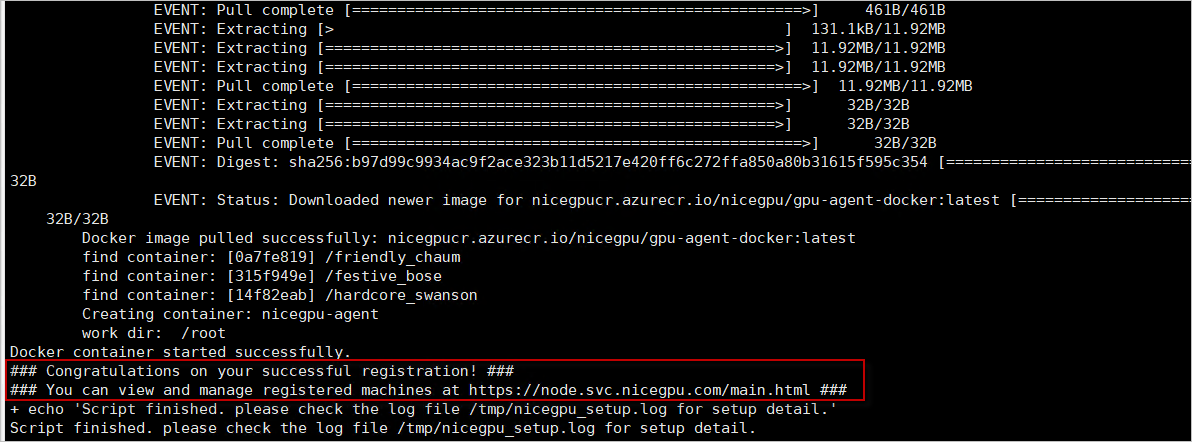
you will see this tip message after successful execution:
3. Ensure nicegpu-agent is Running Properly
Run docker ps to check if nicegpu-agent is running.

4. Common Errors
- If you encounter an error, try running the script again!
- You can also refer to our step-by-step documentation to manually complete the environment configuration and registration.
- You can also get help on the Reddit r/nicegpu: https://www.reddit.com/r/nicegpu/, and we will respond as soon as possible.